Home
About me
LLM powered Smart Suggestions
WellSaid is an industry leader in delivering high-quality, realistic AI voiceover for Enterprise customers. But even the most natural-sounding voice is only as useful as its pronunciation. Users regularly struggled to get voices to pronounce words correctly, particularly with brand names, acronyms, and heteronyms—creating a frustrating barrier to producing accurate, polished voiceover.
Company
WellSaid
Role
Product Designer (solo)
Timeline
4 weeks
Team
Product, Engineering, Sales
Status
Launched in early 2026
Problem
- Pronunciation was unpredictable
- Fixing pronunciation was tedious and required experimentation
- The burden was on the user to figure out a workaround
Solution
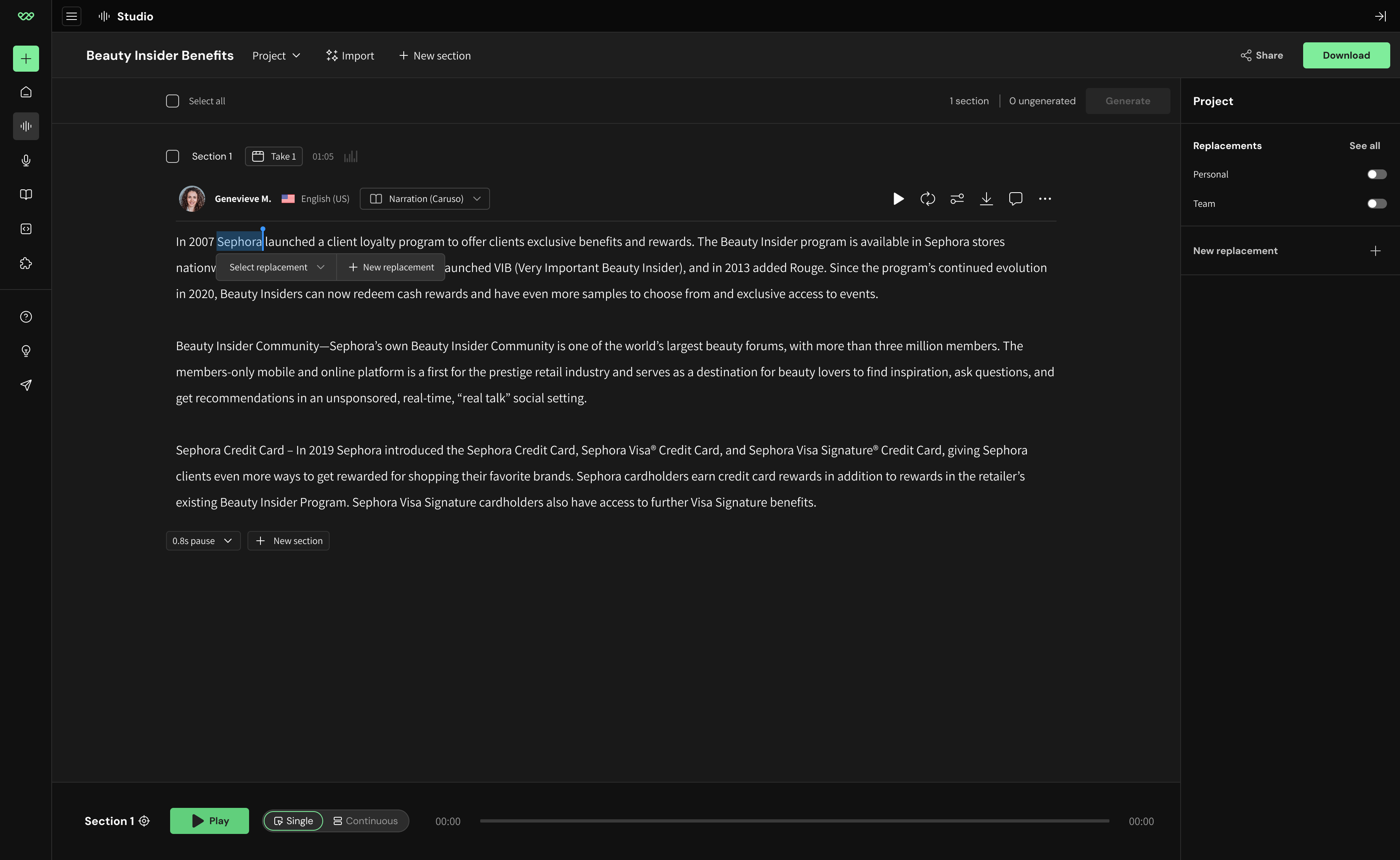
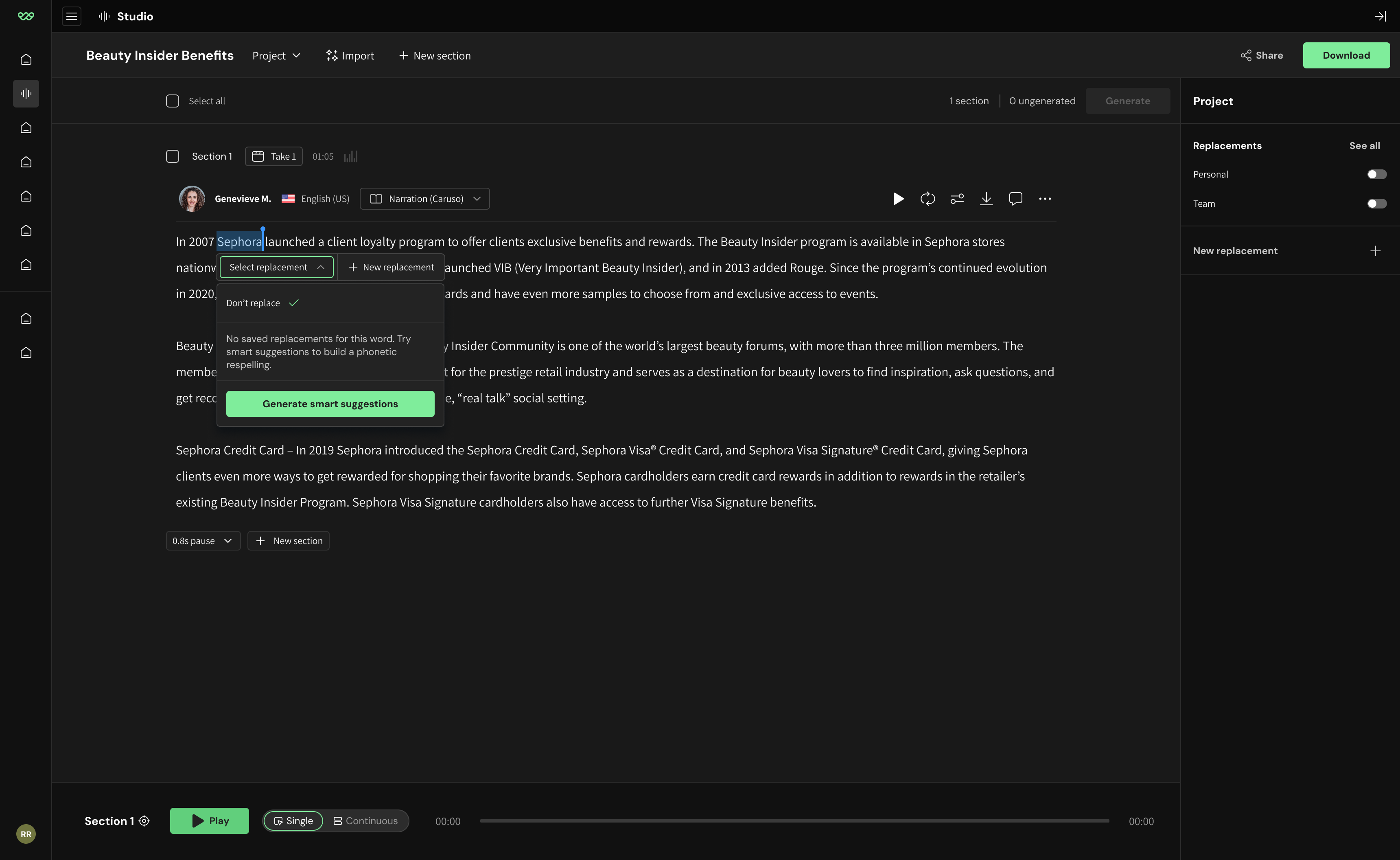
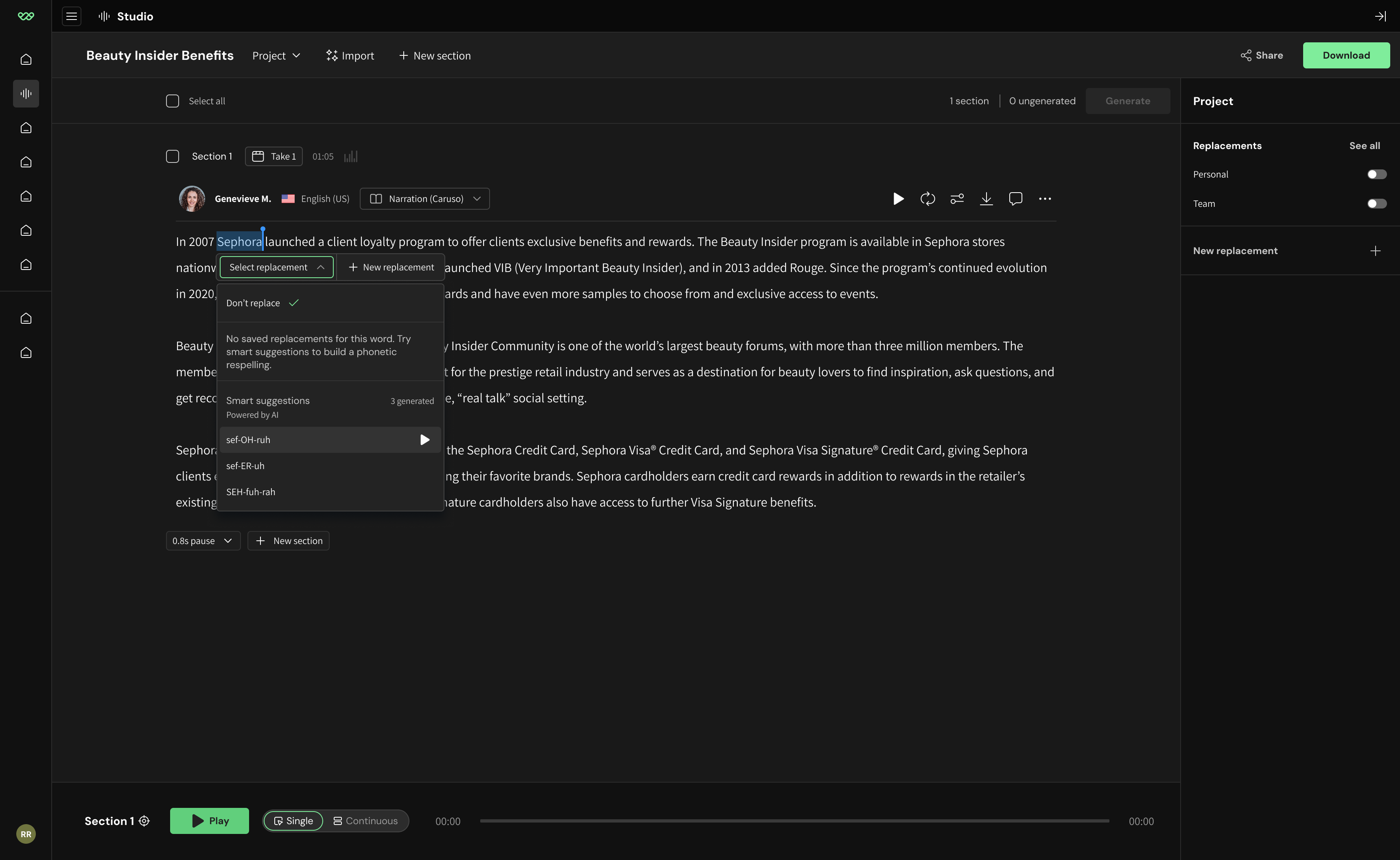
- Leverage an LLM to generate phonetic respelling options tailored to that word
- Listen, choose, and apply a replacement with a single click
Results
- Removed guesswork and manual burden on user to write respellings
- Made corrections faster by removing need to “save” replacements
- Reduced the need for Account Executives to teach customers pronunciation workarounds

Final screens

Process
Problem deep-dive
Existing solutions
Users already had some pronunciation tools available.
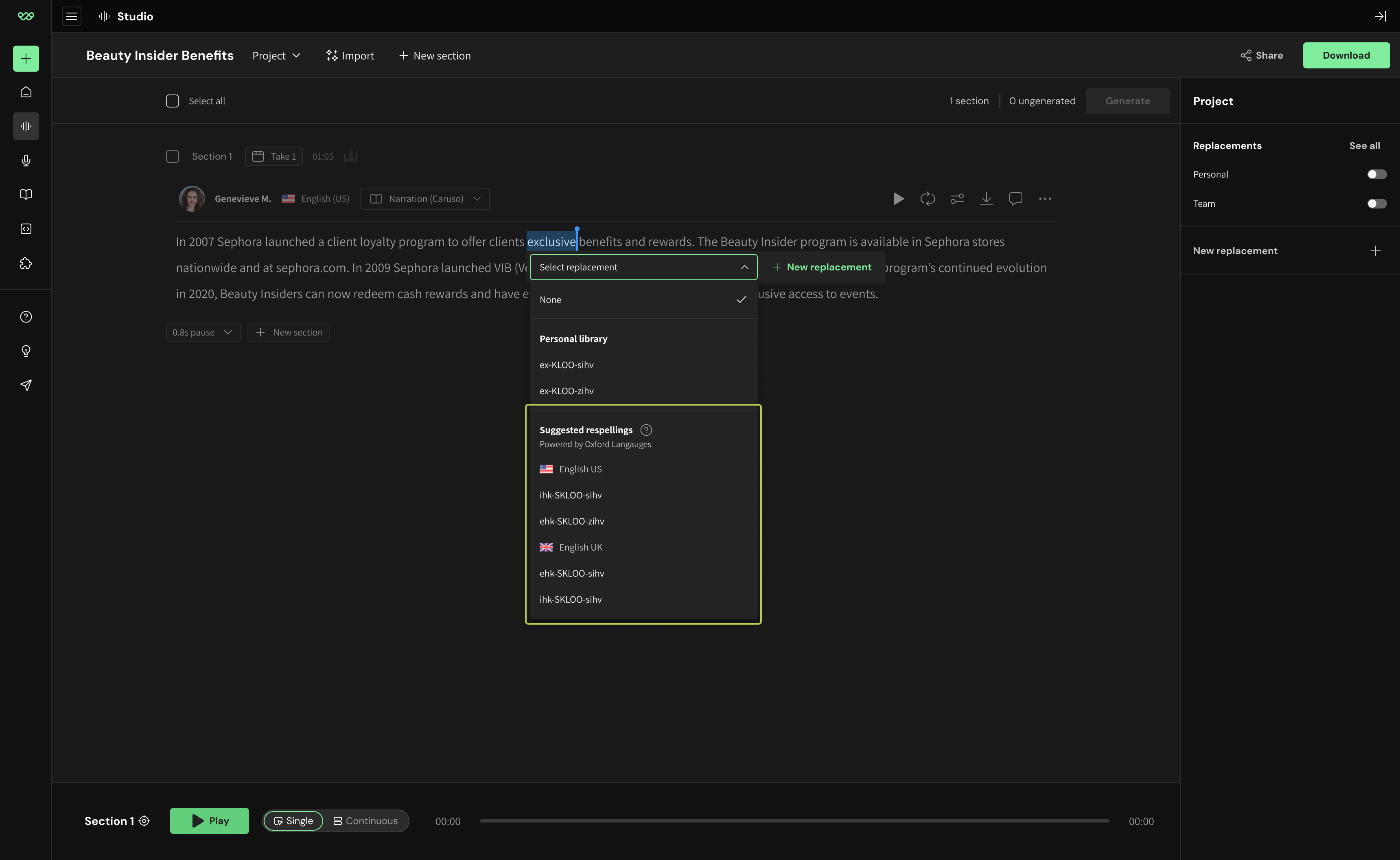
1. Suggested respellings
Auto-generated by WellSaid’s Oxford Languages integration.

Works when the word exists in the Oxford Dictionary.

Fails for initialisms, unfamiliar, proprietary, or nonstandard terms. (Think: “NVIDIA”)
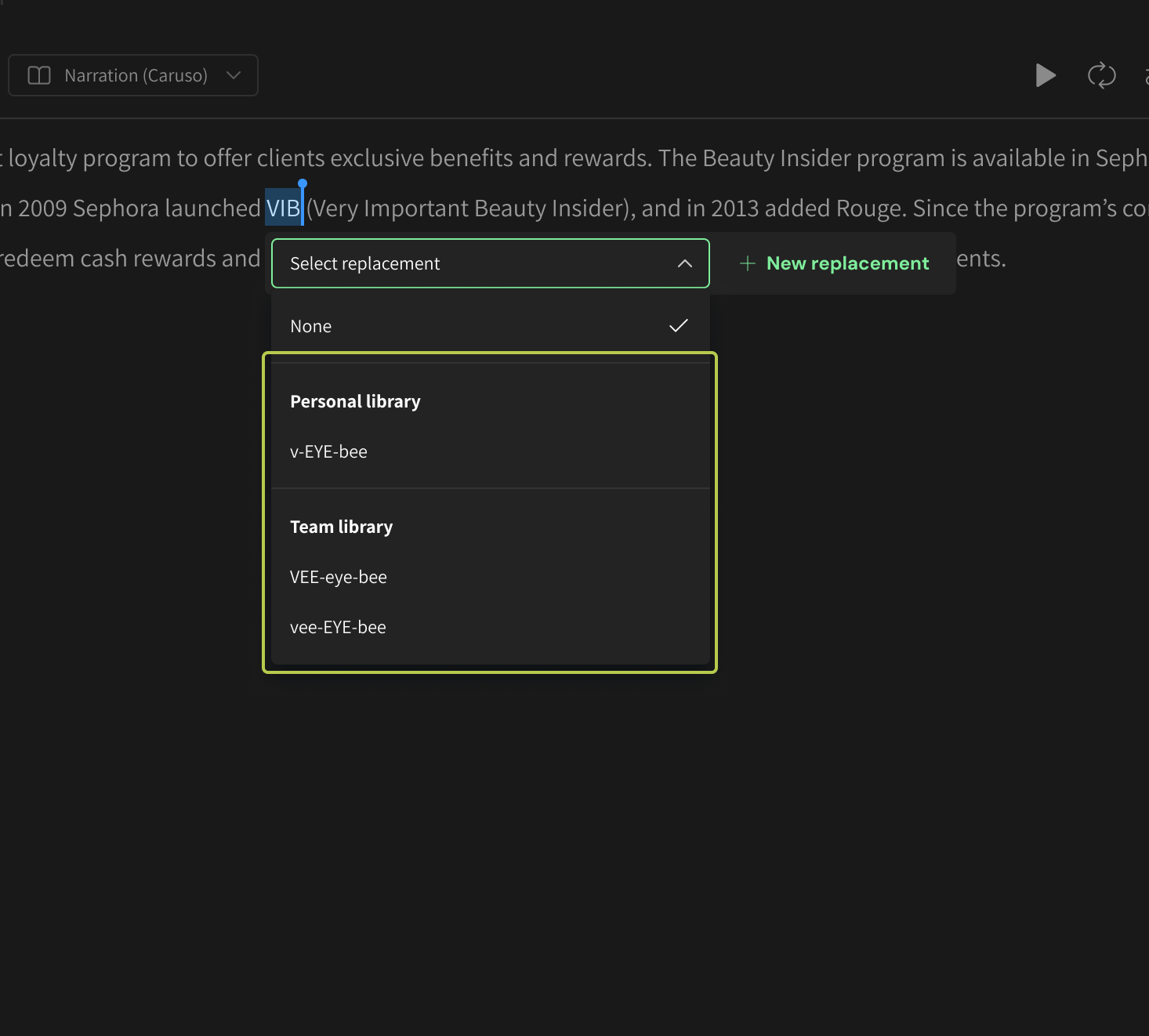
2. Custom replacements
Manually written respellings created by the user and saved to either their Personal or Team library for reuse.
Works for initialisms, unfamiliar, proprietary, or nonstandard terms
Fails when no replacements have been created or saved to a library.
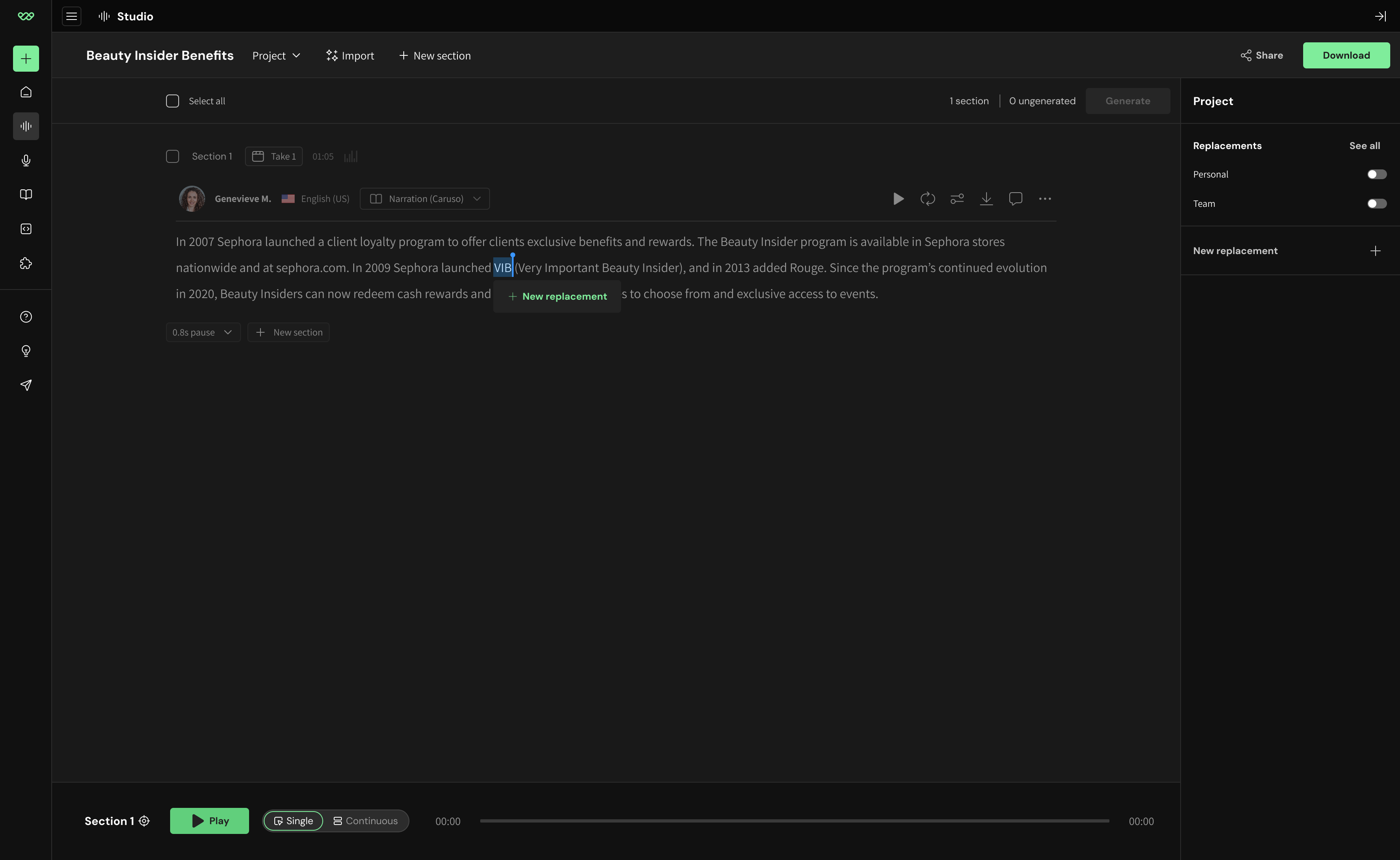
3. New replacement
CTA for creating a new replacement in the sidebar.
Works to help novice users discover the replacement feature.
Fails when the user doesn’t have an understanding of phonetic respelling.
Puts the burden on the user to manually try different spellings.
Proprietary terminology in Enterprise teams
Where WellSaid’s existing pronunciation tools fail.
EXAMPLE SCRIPT
“Our platform integrates with VQStream.”

Words to correct
VQStream
SUGGESTED RESPELLINGS?
None
Saved replacements?
None
New replacement?
Not necessary→
Smart suggestions
vee-KYOO-stree-m
VYOO-stree-m
Endless trial & error
Visualizing the existing user flows demonstrated a clear dead-end for words that didn’t have a clear fix.
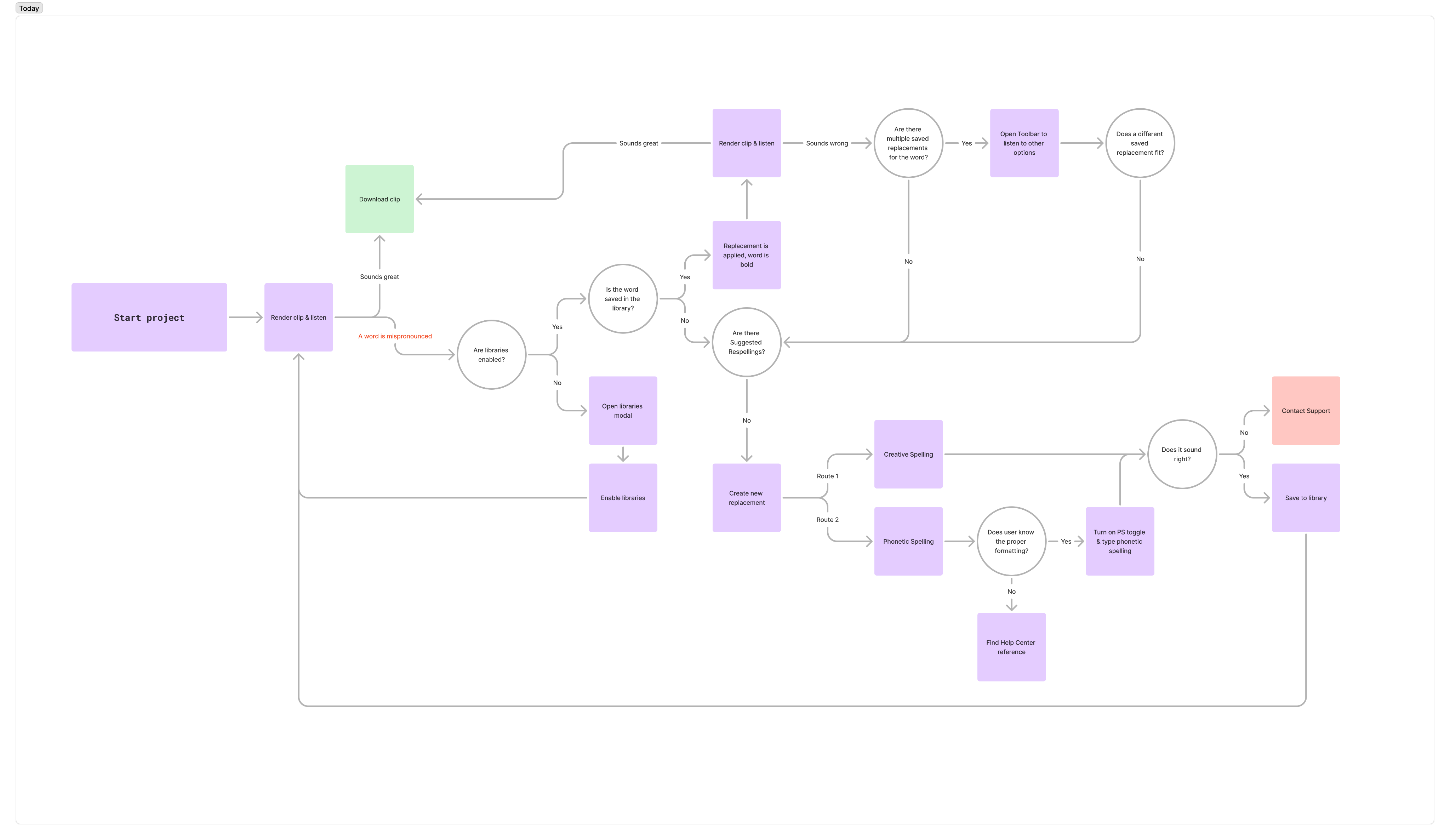
Smart Suggestions address the gap between what Suggested Respellings handled automatically, and what required users to figure out a phonetic spelling themselves.
Design V1
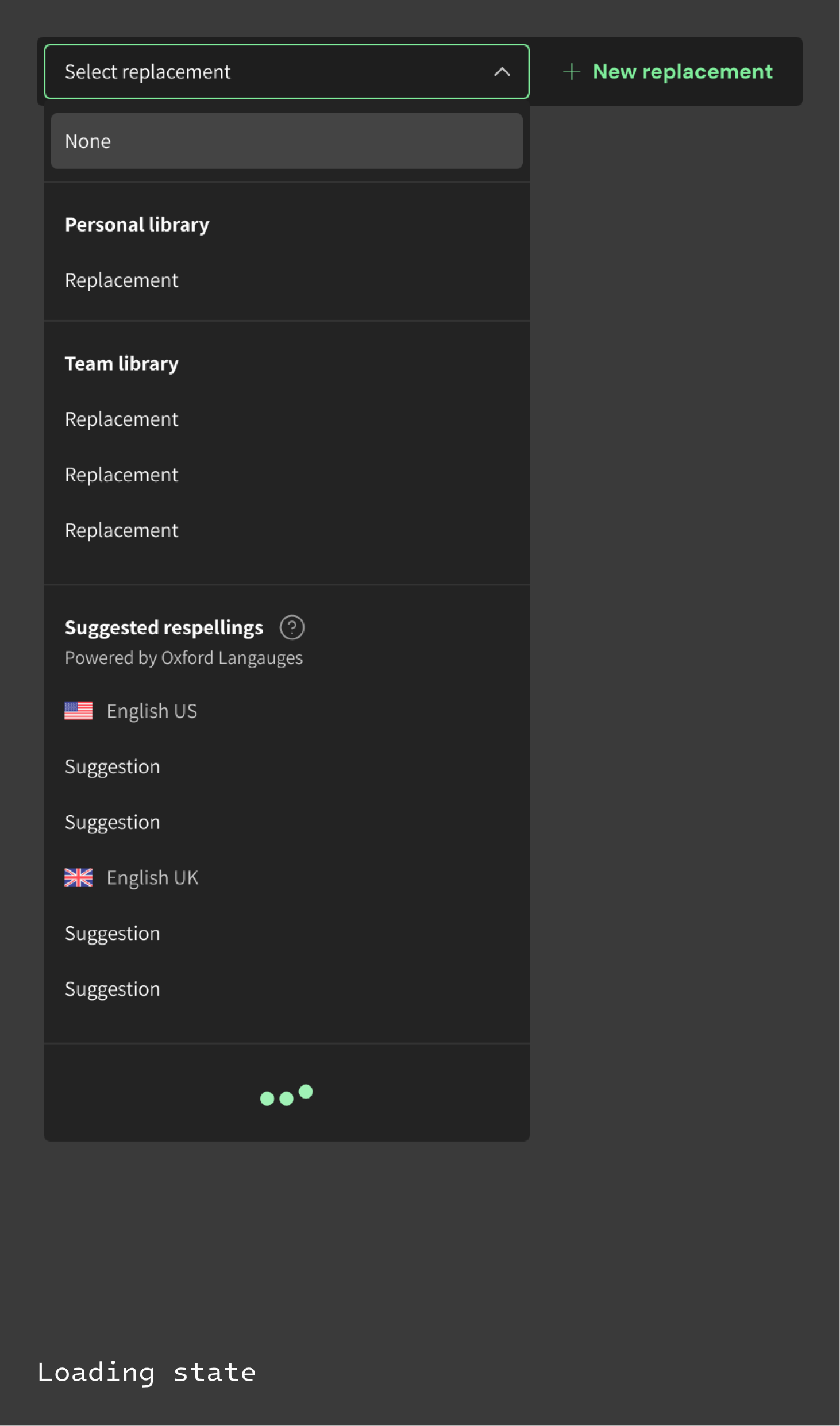
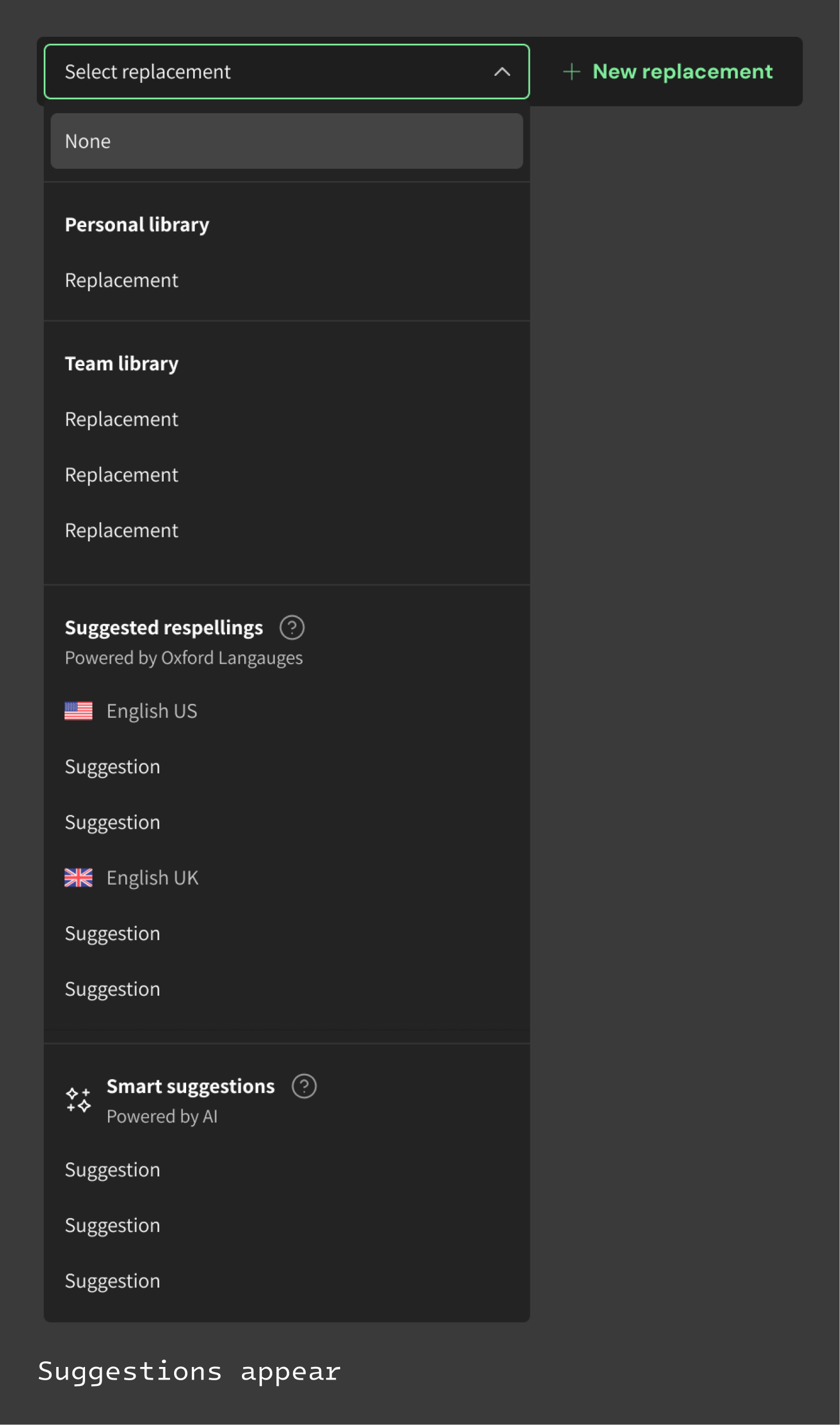
Scaling the toolbar
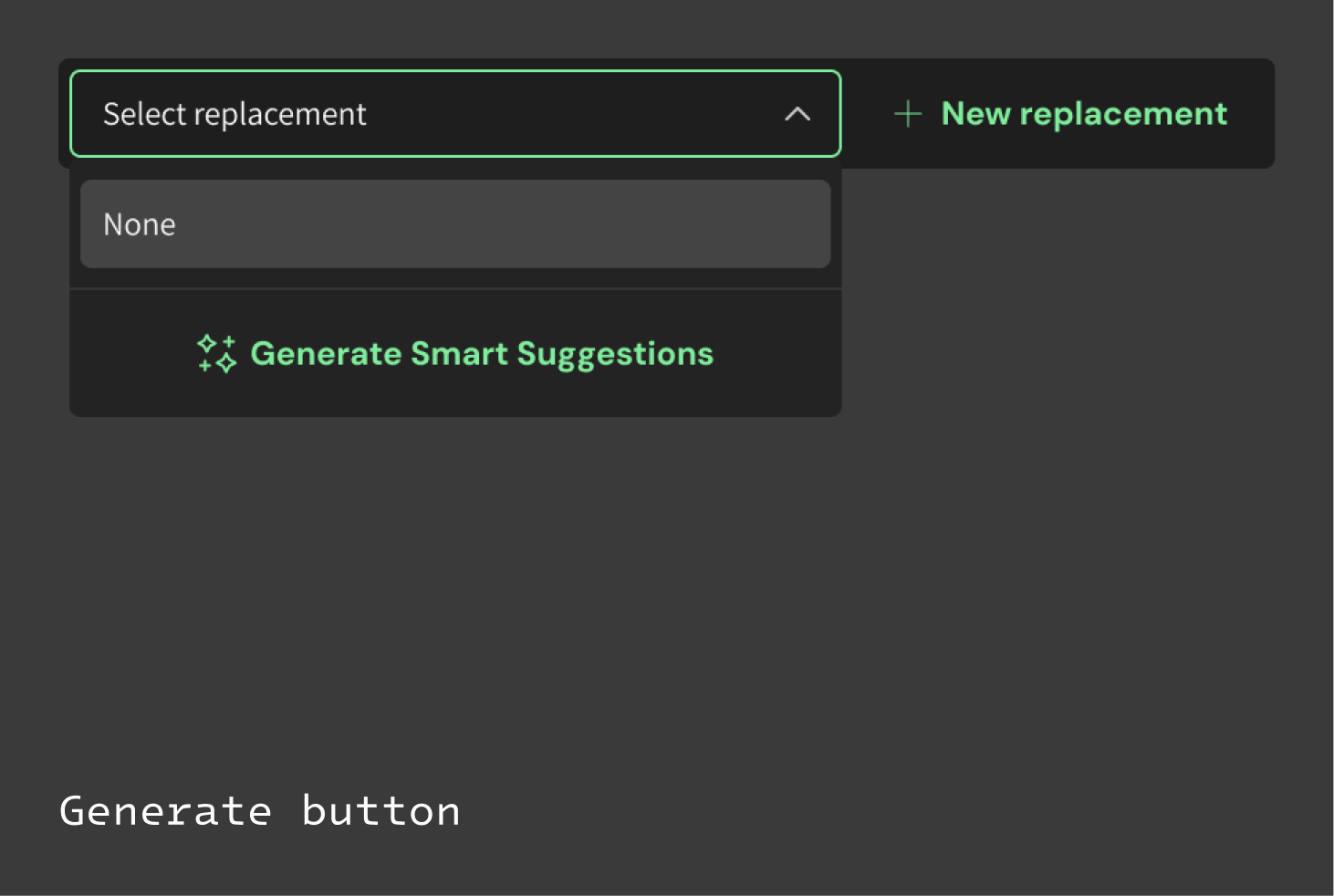
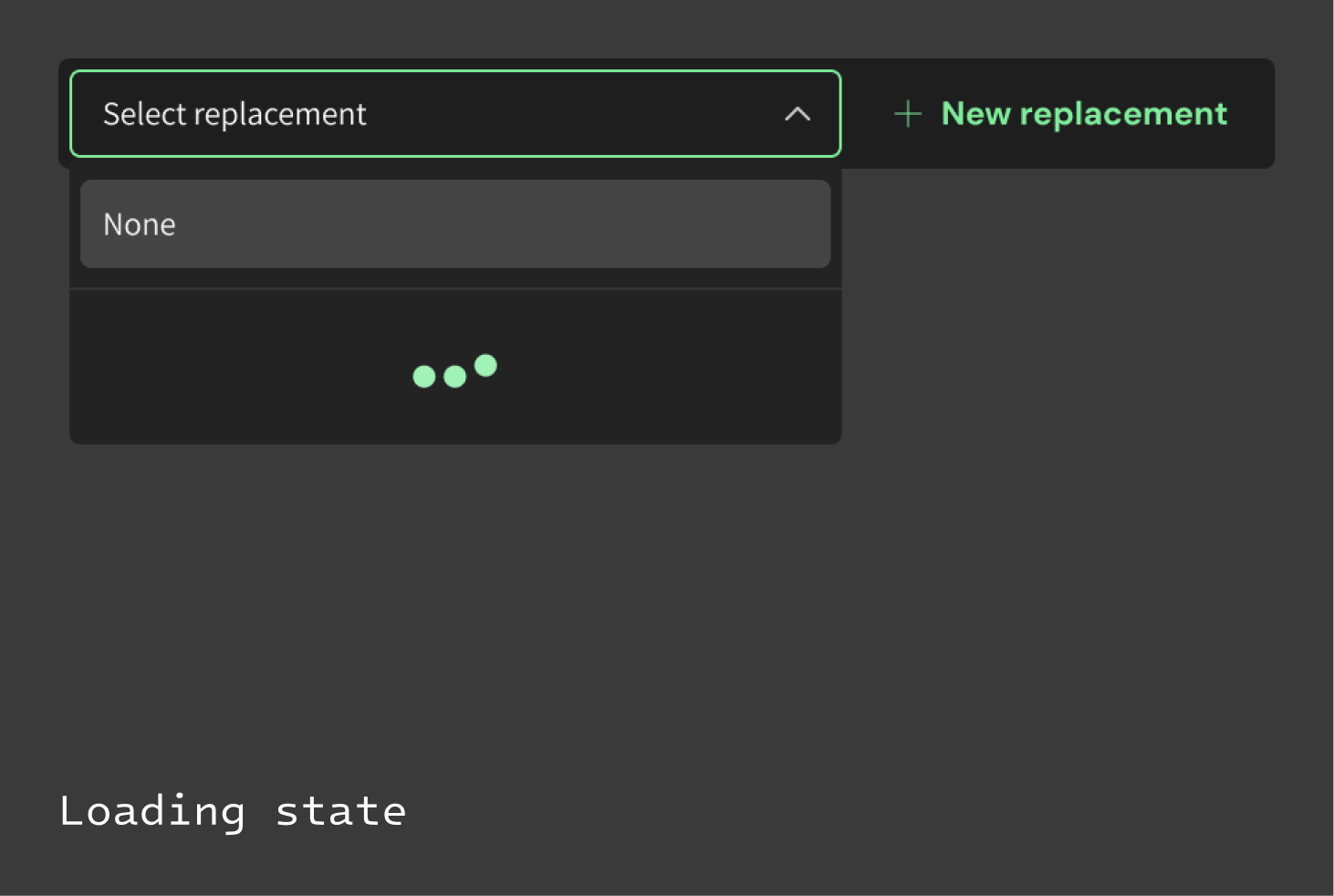
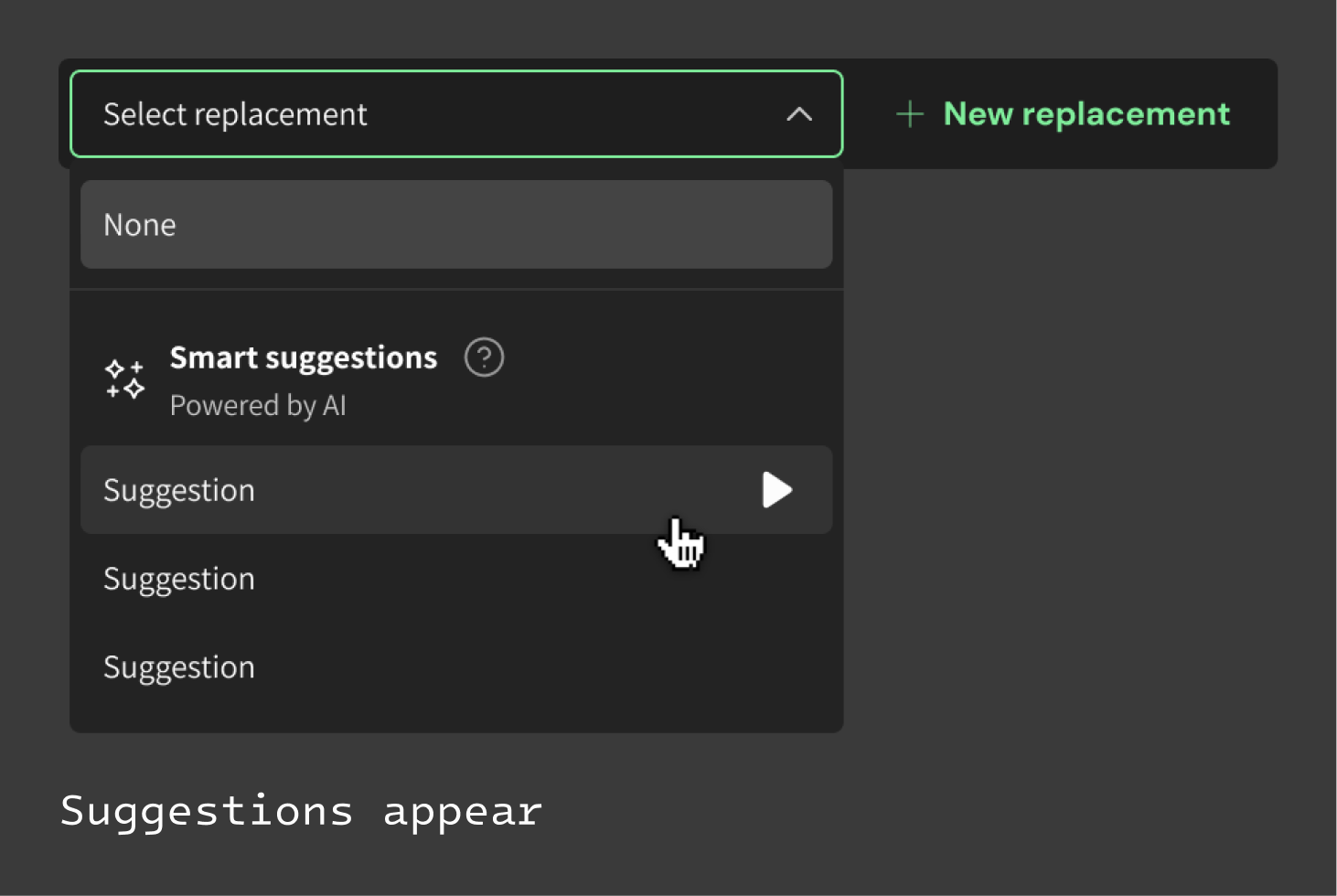
(A) No existing alternatives for the word: Smart Suggestions offer a path forward when neither the user’s libraries nor Oxford could provide a replacement.
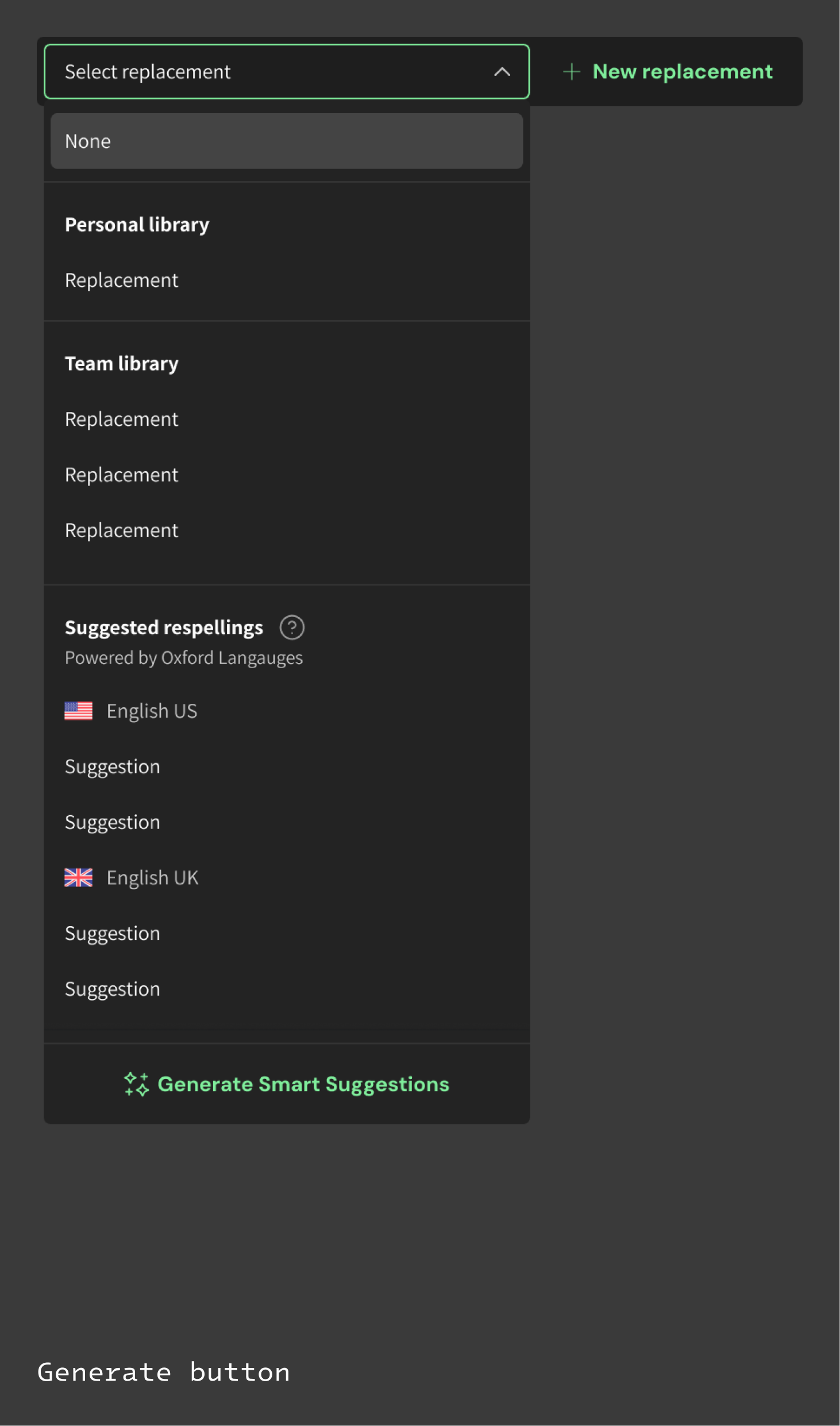
(B) Existing alternatives available: Smart Suggestions provide another option alongside saved replacements and dictionary-based findings.
User feedback
Key findings
“Generate Smart Suggestions” did not read as a clear clickable action. Users hesitated to click.
Once generated, Smart Suggestions were easy to miss among the library and Oxford results. “Did something happen?”
“None” as the default selection in the menu created uncertainty, both the label itself and the selected state treatment.
Users were split on whether they wanted the option to easily save a Smart Suggestion to their library from this point.
Design V2
Refining copy & visual hierarchy
Comparing the current implementation with proposed designs based on customer feedback. The final design review occurred internally, with Product Managers and Customer Success Managers.
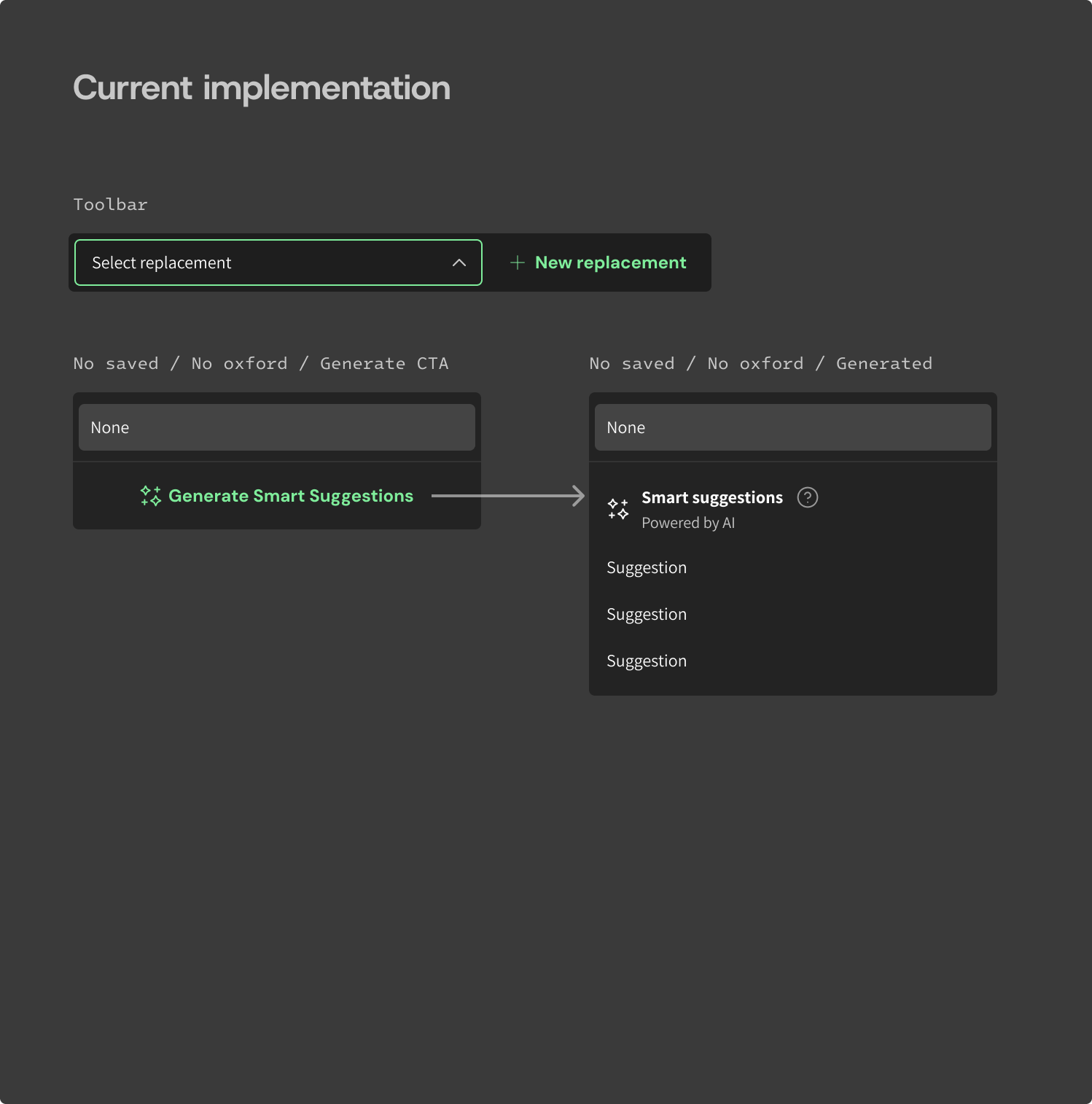
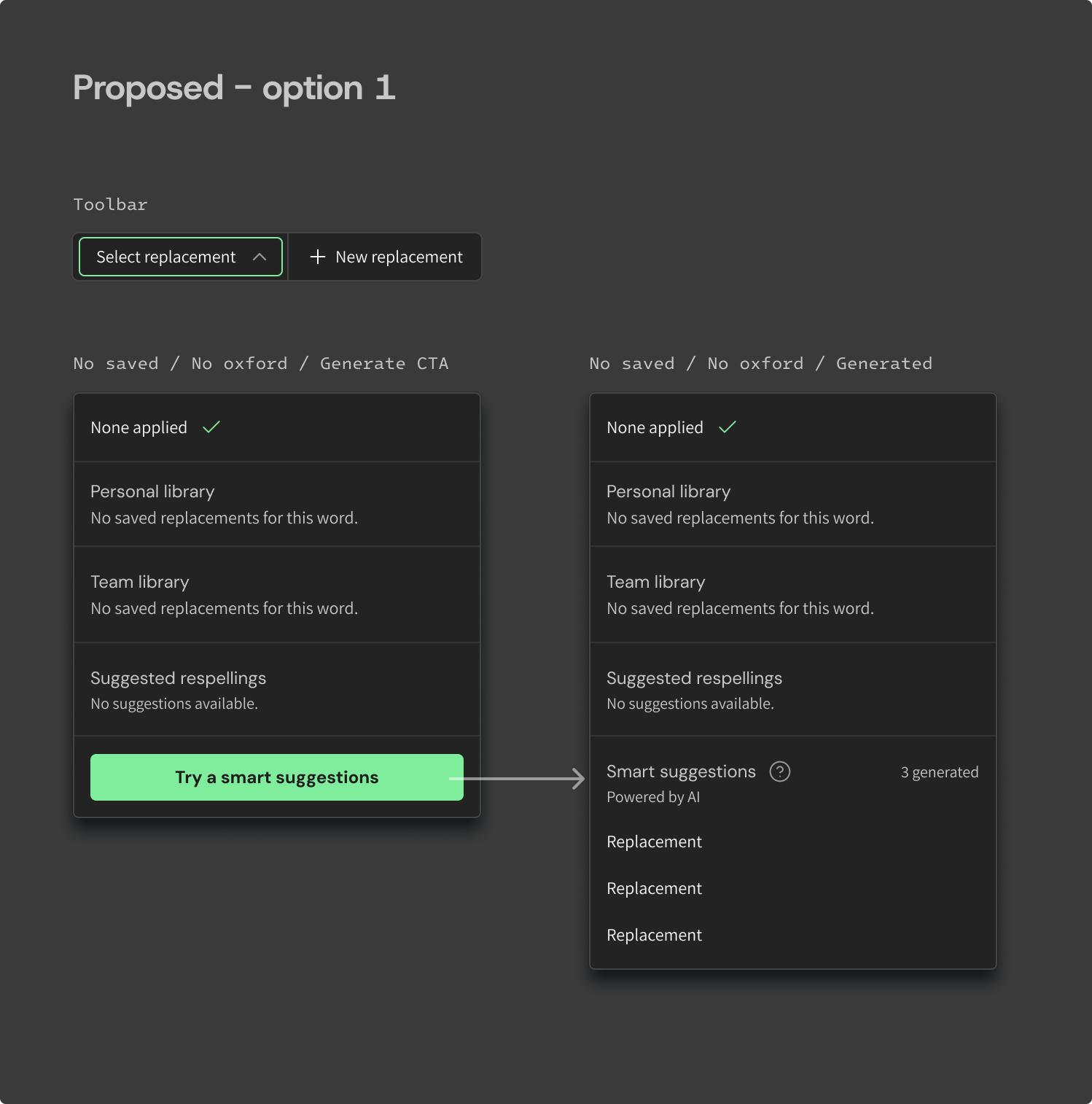
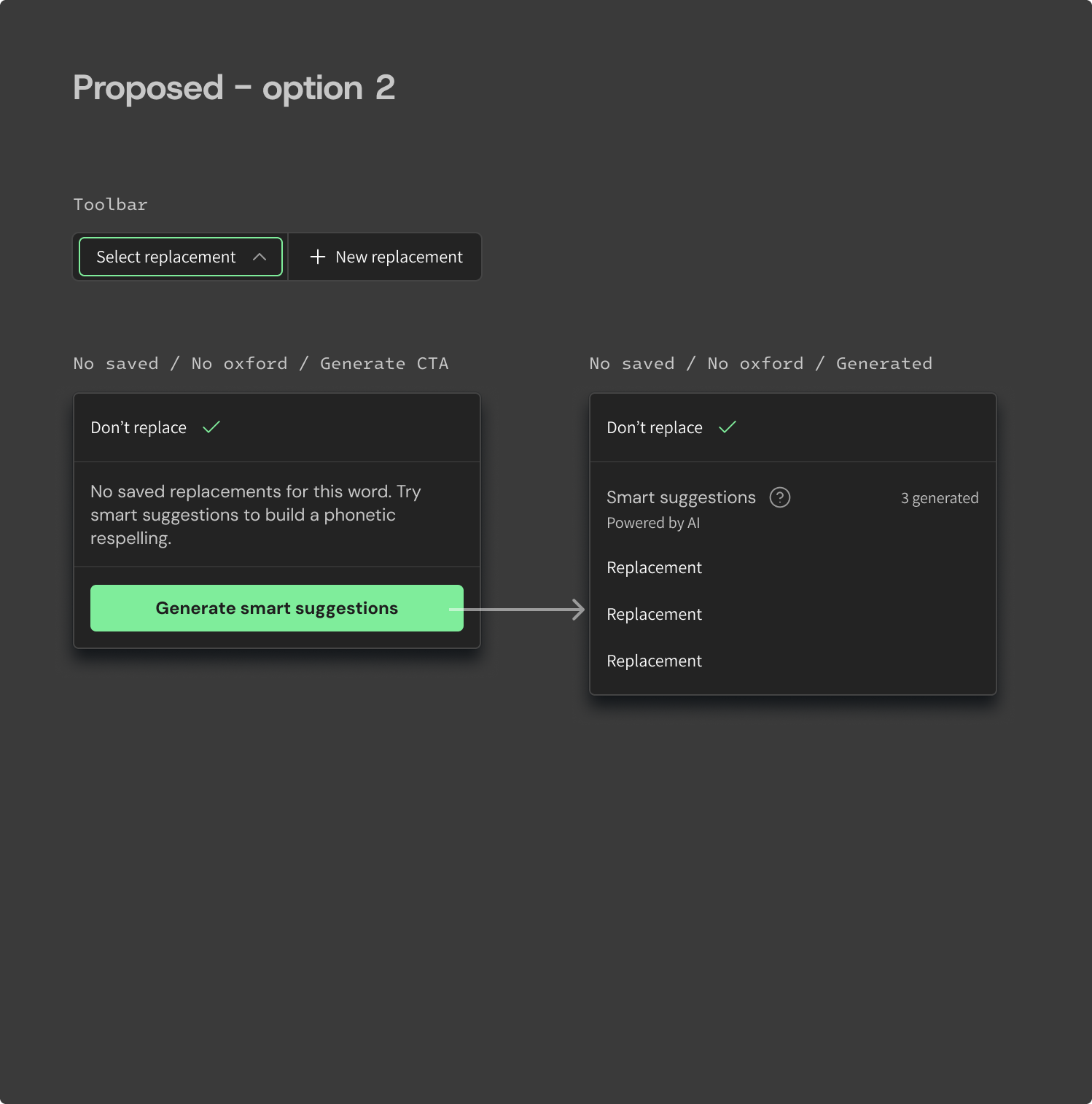
“Generate Smart Suggestions” did not read as a clear clickable action. Users hesitated to click.
FIX
Use our filled primary button treatment. Clarity>Minimalism.
Once generated, Smart Suggestions were easy to miss among the library and Oxford results. “Did something happen?”
FIX
“3 generated” label added as a visual affordance; you generated these.
“None” as the default selection in the menu created uncertainty, both the label itself and the selected state treatment.
FIX
“Don’t replace” read as a label that naturally followed the input “Select replacement.”
Users were split on whether they wanted the option to easily save a Smart Suggestion to their library from this point.
A deliberate scope decision: omitting the “save” experience does not hinder the original problem we are solving for. My suggestion was to move forward until we had stronger evidence to justify the extra work it would take to build this enhancement.

Delivered assets (2026)
Prototype showing behavior
Combinations of the different menu states
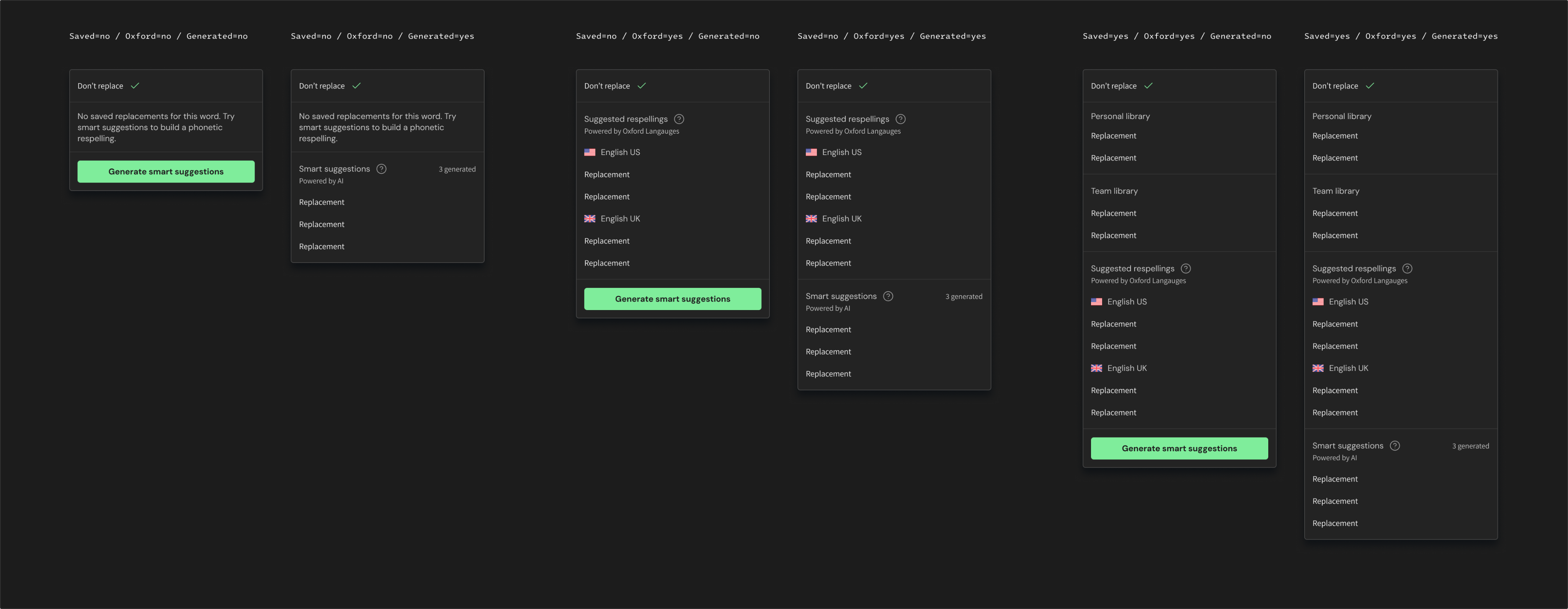
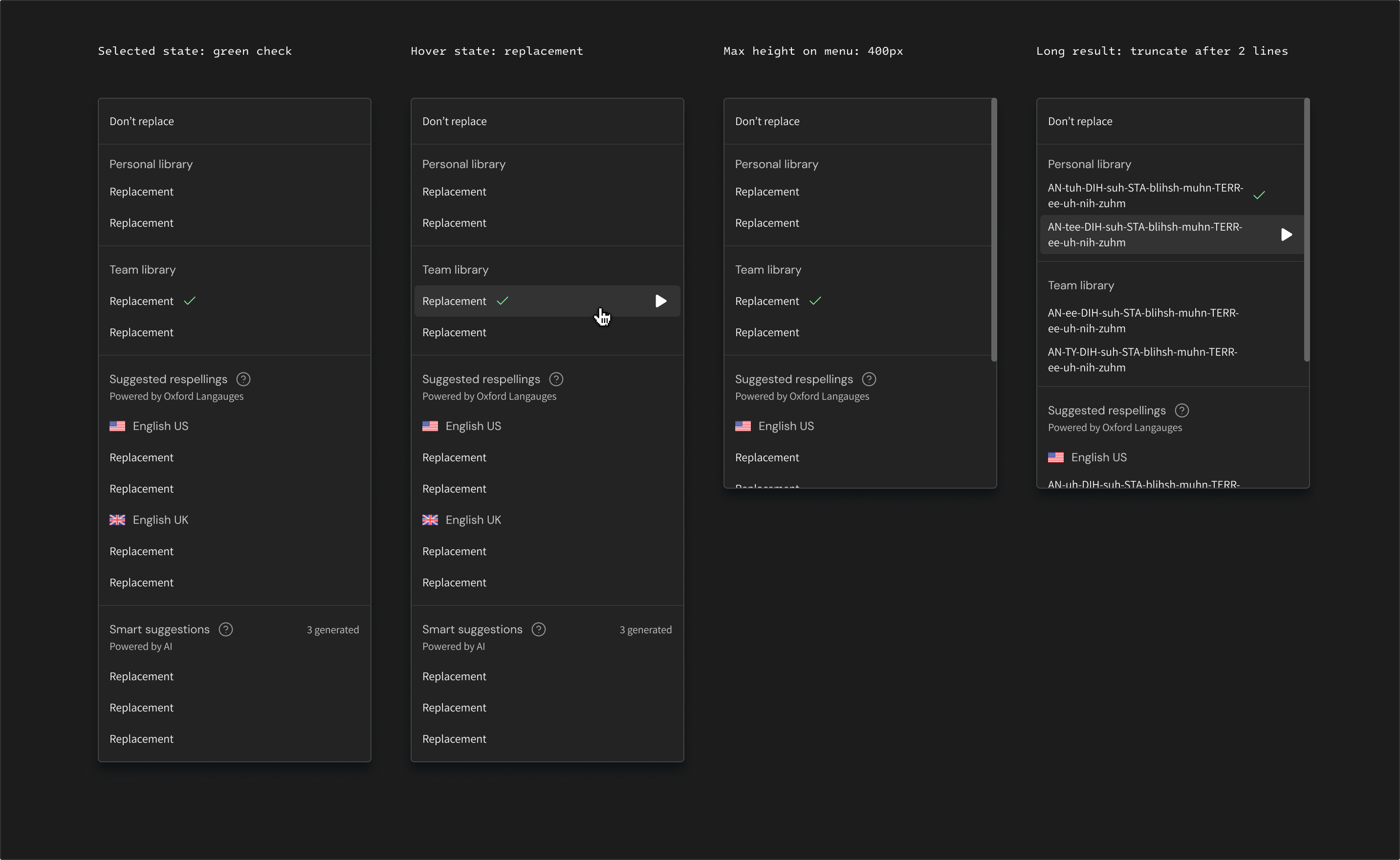
Interaction states & edge cases
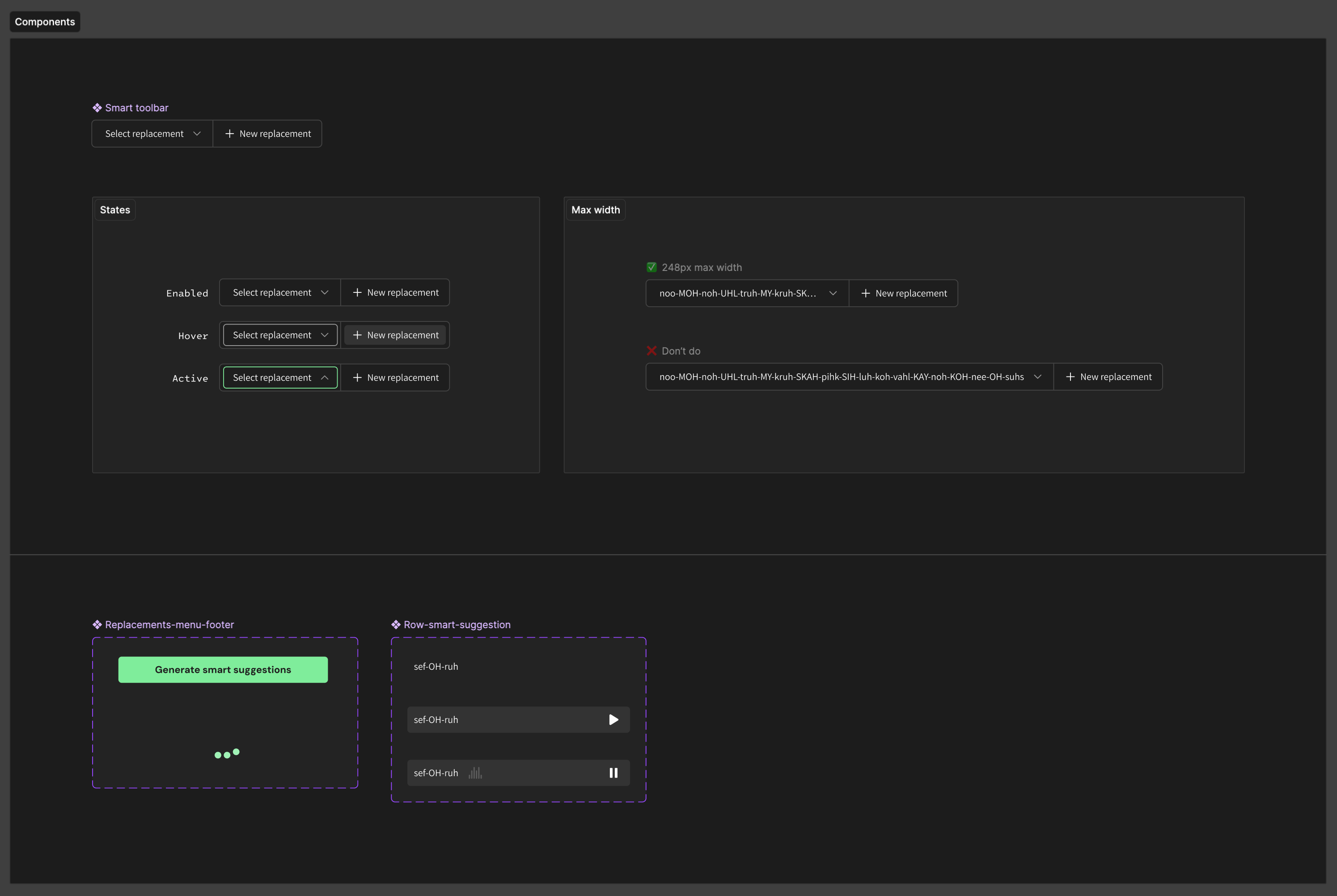
Component additions & adjustments
Back to Home
LLM powered Smart Suggestions
Add-ons for plan limits
Resume
Marina Semez
Home
About me
LLM powered Smart Suggestions
WellSaid is an industry leader in delivering high-quality, realistic AI voiceover for Enterprise customers. But even the most natural-sounding voice is only as useful as its pronunciation. Users regularly struggled to get voices to pronounce words correctly, particularly with brand names, acronyms, and heteronyms—creating a frustrating barrier to producing accurate, polished voiceover.
Company
WellSaid
Role
Product Designer (solo)
Timeline
4 weeks
Team
Product, Engineering, Sales
Status
Launched in early 2026
Problem
- Pronunciation was unpredictable
- Fixing pronunciation was tedious and required experimentation
- The burden was on the user to figure out a workaround
Solution
- Leverage an LLM to generate phonetic respelling options tailored to that word
- Listen, choose, and apply a replacement with a single click
Results
- Removed guesswork and manual burden on user to write respellings
- Made corrections faster by removing need to “save” replacements
- Reduced the need for Account Executives to teach customers pronunciation workarounds

Final screens

Process
Problem deep-dive
Existing solutions
Users already had some pronunciation tools available.
1. Suggested respellings
Auto-generated by WellSaid’s Oxford Languages integration.
Works when the word exists in the Oxford Dictionary.
Fails for initialisms, unfamiliar, proprietary, or nonstandard terms. (Think: “NVIDIA”)
2. Custom replacements
Manually written respellings created by the user and saved to either their Personal or Team library for reuse.
Works for initialisms, unfamiliar, proprietary, or nonstandard terms
Fails when no replacements have been created or saved to a library.
3. New replacement
CTA for creating a new replacement in the sidebar.
Works to help novice users discover the replacement feature.
Fails when the user doesn’t have an understanding of phonetic respelling.
Puts the burden on the user to manually try different spellings.
Proprietary terminology in Enterprise teams
Where WellSaid’s existing pronunciation tools fail.
EXAMPLE SCRIPT
“Our platform integrates with VQStream.”

Words to correct
VQStream
SUGGESTED RESPELLINGS?
None
Saved replacements?
None
New replacement?
Not necessary→
Smart suggestions
vee-KYOO-stree-m
VYOO-stree-m
Endless trial & error
Visualizing the existing user flows demonstrated a clear dead-end for words that didn’t have a clear fix.
Smart Suggestions address the gap between what Suggested Respellings handled automatically, and what required users to figure out a phonetic spelling themselves.
Design V1
Scaling the toolbar
(A) No existing alternatives for the word: Smart Suggestions offer a path forward when neither the user’s libraries nor Oxford could provide a replacement.
(B) Existing alternatives available: Smart Suggestions provide another option alongside saved replacements and dictionary-based findings.
User feedback
Key findings
“Generate Smart Suggestions” did not read as a clear clickable action. Users hesitated to click.
Once generated, Smart Suggestions were easy to miss among the library and Oxford results. “Did something happen?”
“None” as the default selection in the menu created uncertainty, both the label itself and the selected state treatment.
Users were split on whether they wanted the option to easily save a Smart Suggestion to their library from this point.
Design V2
Refining copy & visual hierarchy
Comparing the current implementation with proposed designs based on customer feedback. The final design review occurred internally, with Product Managers and Customer Success Managers.
“Generate Smart Suggestions” did not read as a clear clickable action. Users hesitated to click.
FIX
Use our filled primary button treatment. Clarity>Minimalism.
Once generated, Smart Suggestions were easy to miss among the library and Oxford results. “Did something happen?”
FIX
“3 generated” label added as a visual affordance; you generated these.
“None” as the default selection in the menu created uncertainty, both the label itself and the selected state treatment.
FIX
“Don’t replace” read as a label that naturally followed the input “Select replacement.”
Users were split on whether they wanted the option to easily save a Smart Suggestion to their library from this point.
A deliberate scope decision: omitting the “save” experience does not hinder the original problem we are solving for. My suggestion was to move forward until we had stronger evidence to justify the extra work it would take to build this enhancement.

Delivered assets (2026)
Prototype showing behavior
Combinations of the different menu states
Interaction states & edge cases
Component additions & adjustments
Back to Home
LLM powered Smart Suggestions
Add-ons for plan limits
Resume
Marina Semez
Home
About me
LLM powered Smart Suggestions
WellSaid is an industry leader in delivering high-quality, realistic AI voiceover for Enterprise customers. But even the most natural-sounding voice is only as useful as its pronunciation. Users regularly struggled to get voices to pronounce words correctly, particularly with brand names, acronyms, and heteronyms—creating a frustrating barrier to producing accurate, polished voiceover.
Company
WellSaid
Role
Product Designer (solo)
Timeline
4 weeks
Team
Product, Engineering, Sales
Status
Launched in early 2026
Problem
- Pronunciation was unpredictable
- Fixing pronunciation was tedious and required experimentation
- The burden was on the user to figure out a workaround
Solution
- Leverage an LLM to generate phonetic respelling options tailored to that word
- Listen, choose, and apply a replacement with a single click
Results
- Removed guesswork and manual burden on user to write respellings
- Made corrections faster by removing need to “save” replacements
- Reduced the need for Account Executives to teach customers pronunciation workarounds

Final screens

Process
Problem deep-dive
Existing solutions
Users already had some pronunciation tools available.
1. Suggested respellings
Auto-generated by WellSaid’s Oxford Languages integration.

Works when the word exists in the Oxford Dictionary.

Fails for initialisms, unfamiliar, proprietary, or nonstandard terms. (Think: “NVIDIA”)
2. Custom replacements
Manually written respellings created by the user and saved to either their Personal or Team library for reuse.
Works for initialisms, unfamiliar, proprietary, or nonstandard terms
Fails when no replacements have been created or saved to a library.
3. New replacement
CTA for creating a new replacement in the sidebar.
Works to help novice users discover the replacement feature.
Fails when the user doesn’t have an understanding of phonetic respelling.
Puts the burden on the user to manually try different spellings.
Proprietary terminology in Enterprise teams
Where WellSaid’s existing pronunciation tools fail.
EXAMPLE SCRIPT
“Our platform integrates with VQStream.”

Words to correct
VQStream
SUGGESTED RESPELLINGS?
None
Saved replacements?
None
New replacement?
Not necessary→
Smart suggestions
vee-KYOO-stree-m
VYOO-stree-m
Endless trial & error
Visualizing the existing user flows demonstrated a clear dead-end for words that didn’t have a clear fix.
Smart Suggestions address the gap between what Suggested Respellings handled automatically, and what required users to figure out a phonetic spelling themselves.
Design V1
Scaling the toolbar
(A) No existing alternatives for the word: Smart Suggestions offer a path forward when neither the user’s libraries nor Oxford could provide a replacement.
(B) Existing alternatives available: Smart Suggestions provide another option alongside saved replacements and dictionary-based findings.
User feedback
Key findings
“Generate Smart Suggestions” did not read as a clear clickable action. Users hesitated to click.
Once generated, Smart Suggestions were easy to miss among the library and Oxford results. “Did something happen?”
“None” as the default selection in the menu created uncertainty, both the label itself and the selected state treatment.
Users were split on whether they wanted the option to easily save a Smart Suggestion to their library from this point.
Design V2
Refining copy & visual hierarchy
Comparing the current implementation with proposed designs based on customer feedback. The final design review occurred internally, with Product Managers and Customer Success Managers.
“Generate Smart Suggestions” did not read as a clear clickable action. Users hesitated to click.
FIX
Use our filled primary button treatment. Clarity>Minimalism.
Once generated, Smart Suggestions were easy to miss among the library and Oxford results. “Did something happen?”
FIX
“3 generated” label added as a visual affordance; you generated these.
“None” as the default selection in the menu created uncertainty, both the label itself and the selected state treatment.
FIX
“Don’t replace” read as a label that naturally followed the input “Select replacement.”
Users were split on whether they wanted the option to easily save a Smart Suggestion to their library from this point.
A deliberate scope decision: omitting the “save” experience does not hinder the original problem we are solving for. My suggestion was to move forward until we had stronger evidence to justify the extra work it would take to build this enhancement.

Delivered assets (2026)
Prototype showing behavior
Combinations of the different menu states
Interaction states & edge cases
Component additions & adjustments
Back to Home
LLM powered Smart Suggestions
Add-ons for plan limits
Resume